
2025 was a big year for 3YOURMIND's product development team. Across seven major releases, we focused on three themes: better decision-making, less manual work, and faster flow from part screening to production.
Before we begin rolling out new releases in 2026, here’s a review of the most impactful improvements we shipped last year.
Stronger AI-Powered Technical Drawing Analysis
We strengthened our AI-powered technical drawing analysis capabilities to improve reliability and transparency when extracting technical data from drawings.
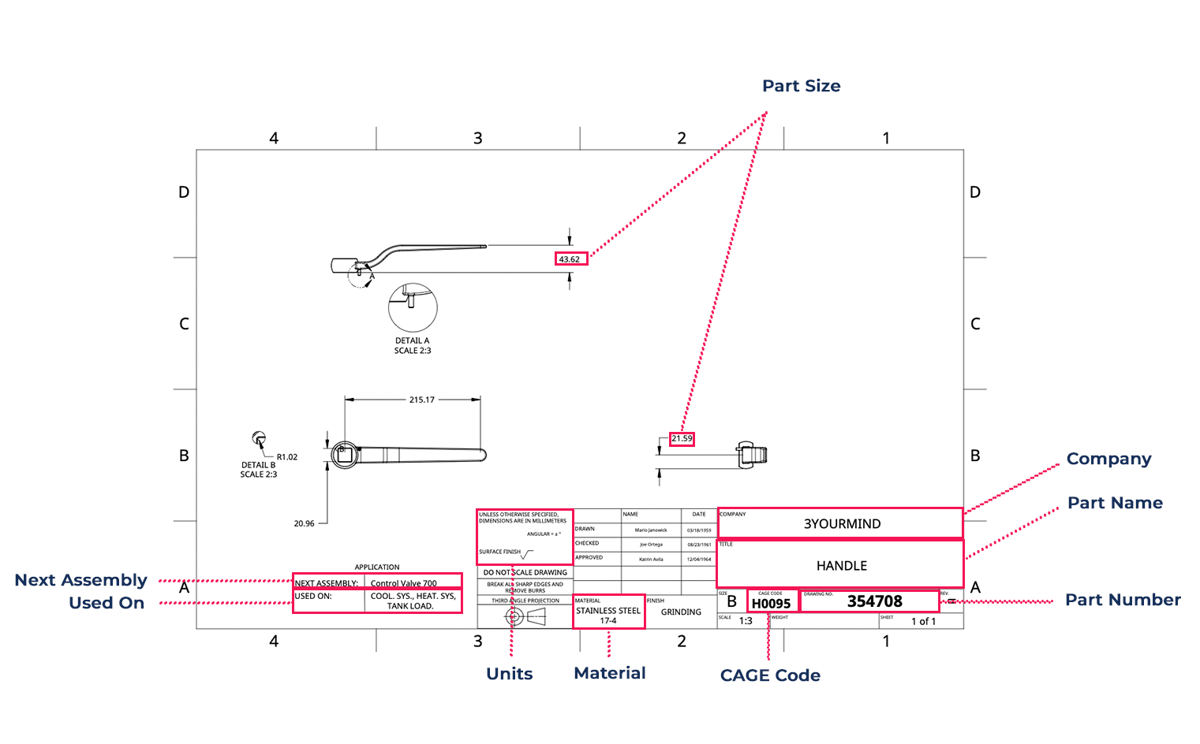 Use AI Technical Drawing analysis to extract data from 2D drawings, either individually or via bulk uploads.
The system now supports multi-page PDFs, ensuring complex engineering drawings are fully analyzed rather than partially processed. In addition, we introduced confidence indicators that signal when extracted data may fall below reliability thresholds. This gives teams clearer visibility into when automated extraction can be trusted — and when manual verification may be needed — reducing risk while maintaining efficiency.
Smarter Part Identification and Manufacturability Insights
We made part screening more powerful and more usable.
Across the year, we introduced and expanded a comprehensive set of manufacturability checks, including complexity, accessibility, trapped material, gap analysis, sharp edges, and cross-section area. These checks help teams catch design risks early and avoid costly iterations later.
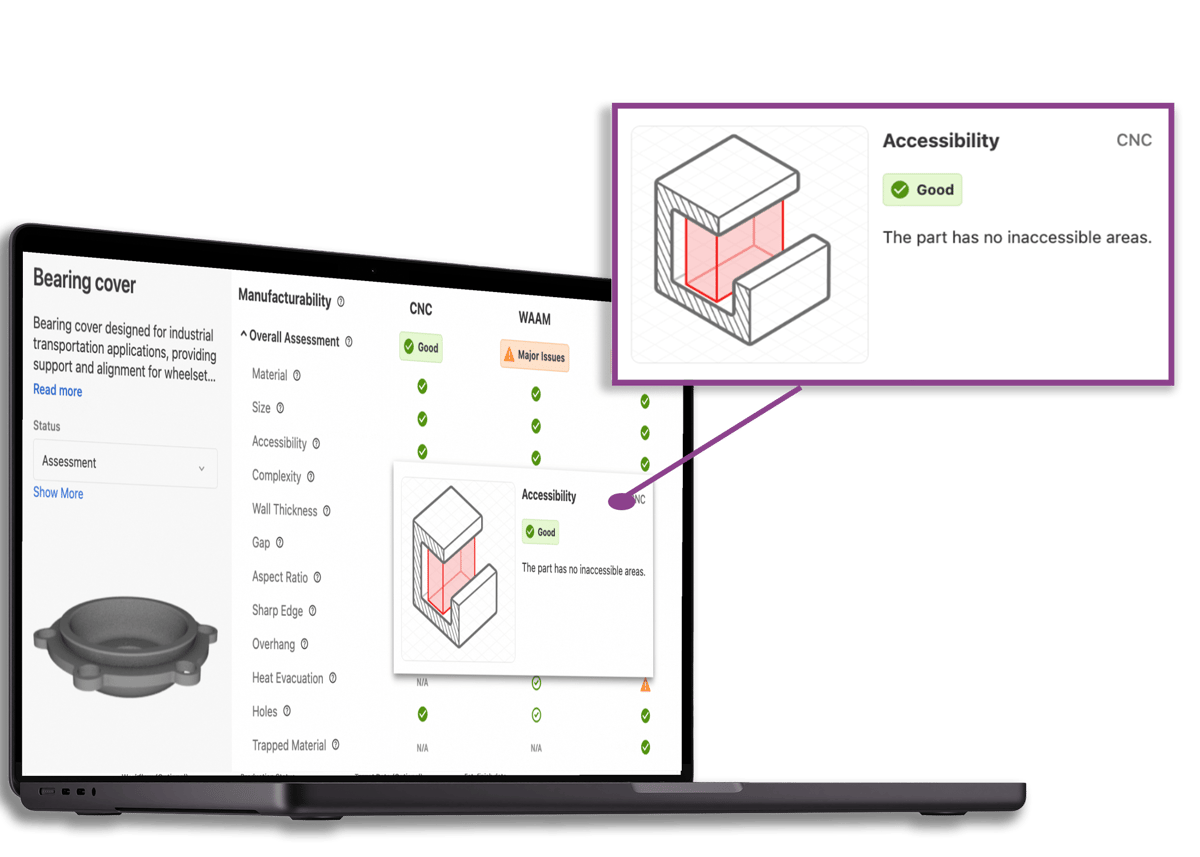
In 25.6, we added helpful tooltips and illustrations, making it easier to understand and act on manufacturability feedback for redesign.
We also enabled conventional manufacturing (e.g., CNC) alongside additive manufacturing, so users can compare feasible production routes in one place rather than treating AM in isolation.
To turn insights into action, we added visual tooltips and illustrations to explain why a design fails a check and what to change. Each technology now has customizable helper text (materials, machines, internal capabilities), reducing onboarding friction and removing ambiguity around terms like “CNC” or “DMLS.”
We improved cost transparency with flexible, technology-aware breakdowns (material, machine, labor, post-processing, overhead), giving stakeholders a clearer picture of what drives price and where trade-offs make sense.
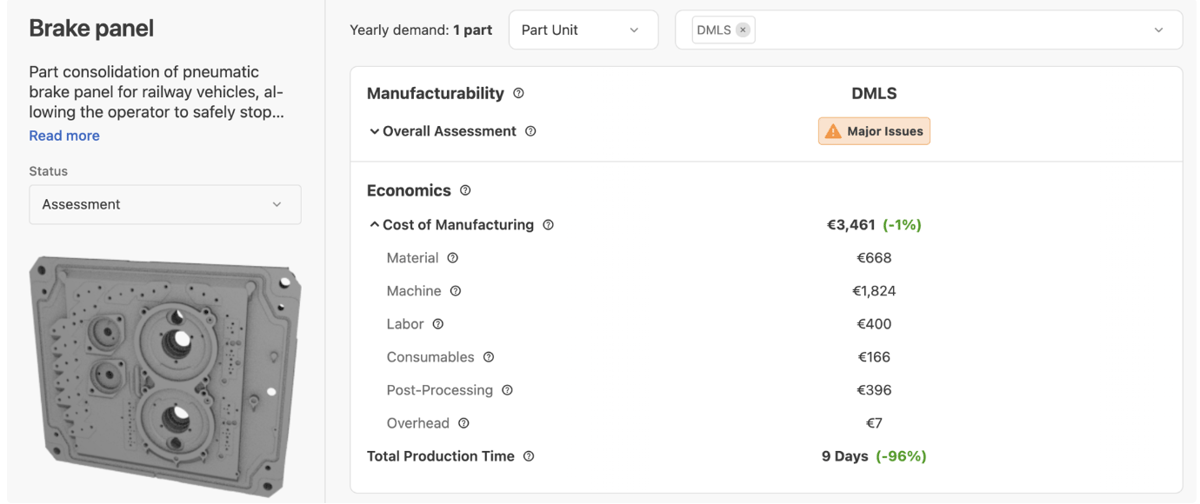 In 25.8, we introduced a new layout that highlights production costs with detailed, customizable rows.
Finally, we made it easier to scan large sets of parts by showing applicable technologies at a glance in the part list, helping teams quickly prioritize feasible parts.
Cleaner Data and More Automation
2025 delivered major upgrades to data quality and automation, cutting manual work and improving trust in assessments.
We overhauled material handling with a new Reference Material field and AI-powered material mapping, automatically aligning imported materials from 2D and 3D files to internal material classes for more reliable manufacturability results.
Automatic assembly detection for both 2D and 3D uploads now flags assemblies clearly in lists and reports, so teams can filter out non-analyzable drawings and focus on true single parts.
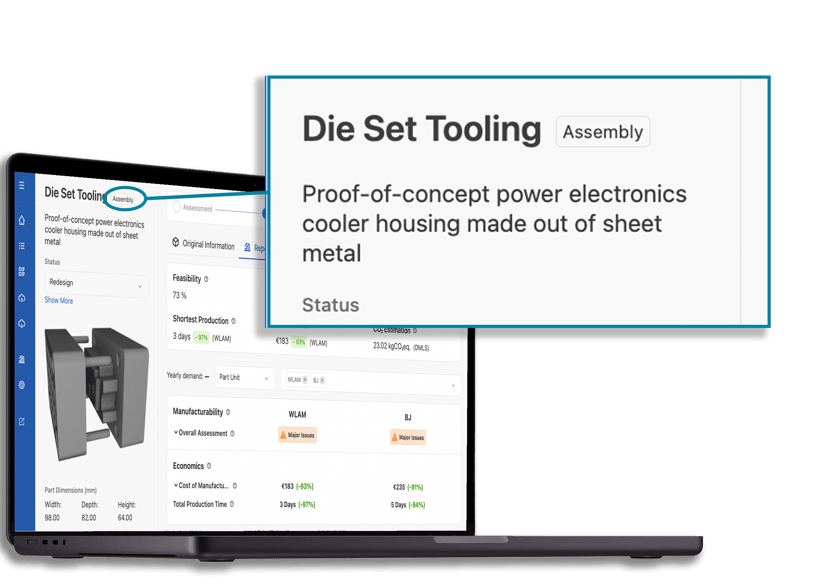 In 25.6, we added a new feature that automatically identifies whether an uploaded file (3D or 2D) is an assembly. No manual input required.
We standardized core metadata using a new System field and introduced Due Date and custom date fields to improve prioritization and filtering. Automated part number extraction from filenames further reduced manual entry and errors.
Faster Screening at Scale
As inventories grow, speed matters.
We shipped smarter filters for manufacturability status, dimensions, missing fields, analysis status, and low-confidence data. Combined with improved filter logic, this makes it easy to find problem parts in large datasets.
We also invested heavily in performance, delivering faster loading of large lists and snappier navigation across workspaces.
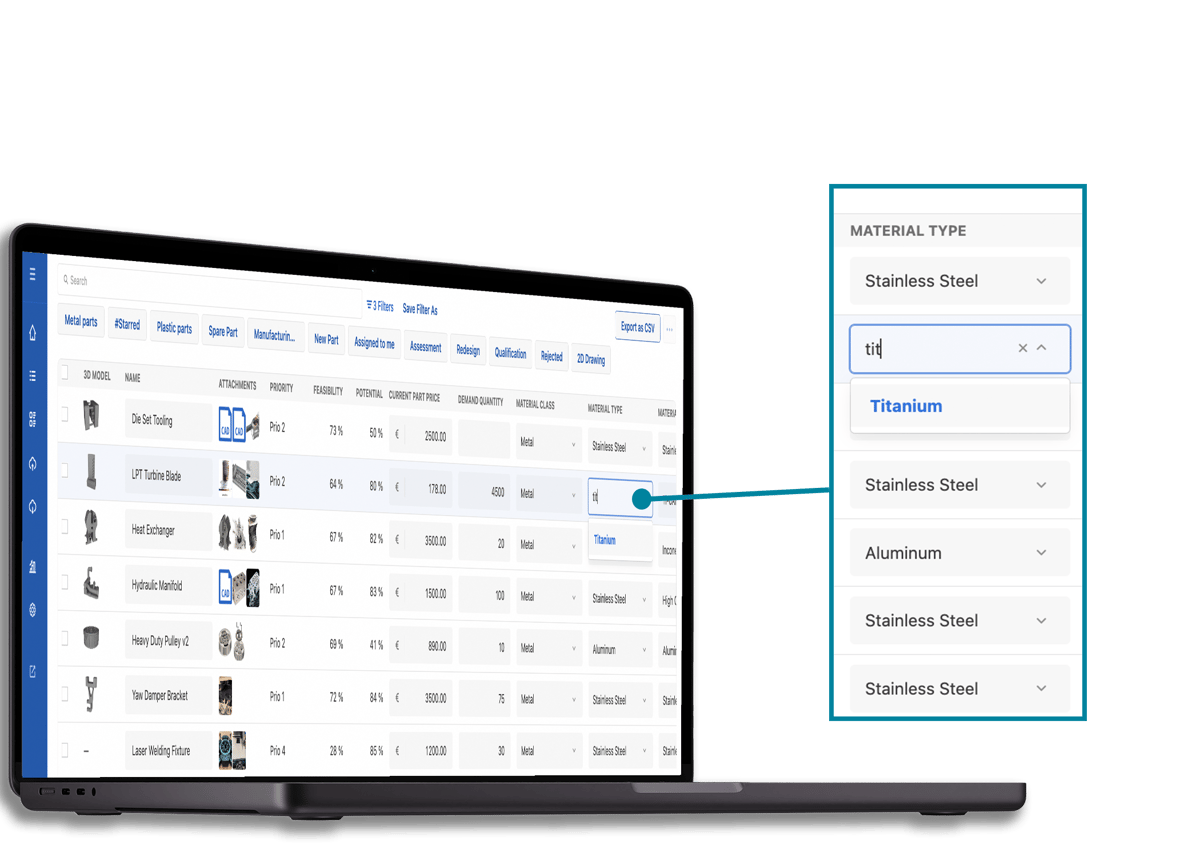 In 25.8, we unveiled Live Part Editing, which enables users to edit information across multiple parts from a single global view.
The former Part List evolved into a clearer Part Inventory with a refreshed UI, KPI section, fixed headers, improved sorting, and smoother navigation between list and detail views. Live editing in lists and batch uploads (3D and 2D) made enrichment and onboarding faster.
Smoother Ordering, Quoting, and Distributed Manufacturing
We streamlined the path from configuration to order creation, especially for large, multi-line jobs.
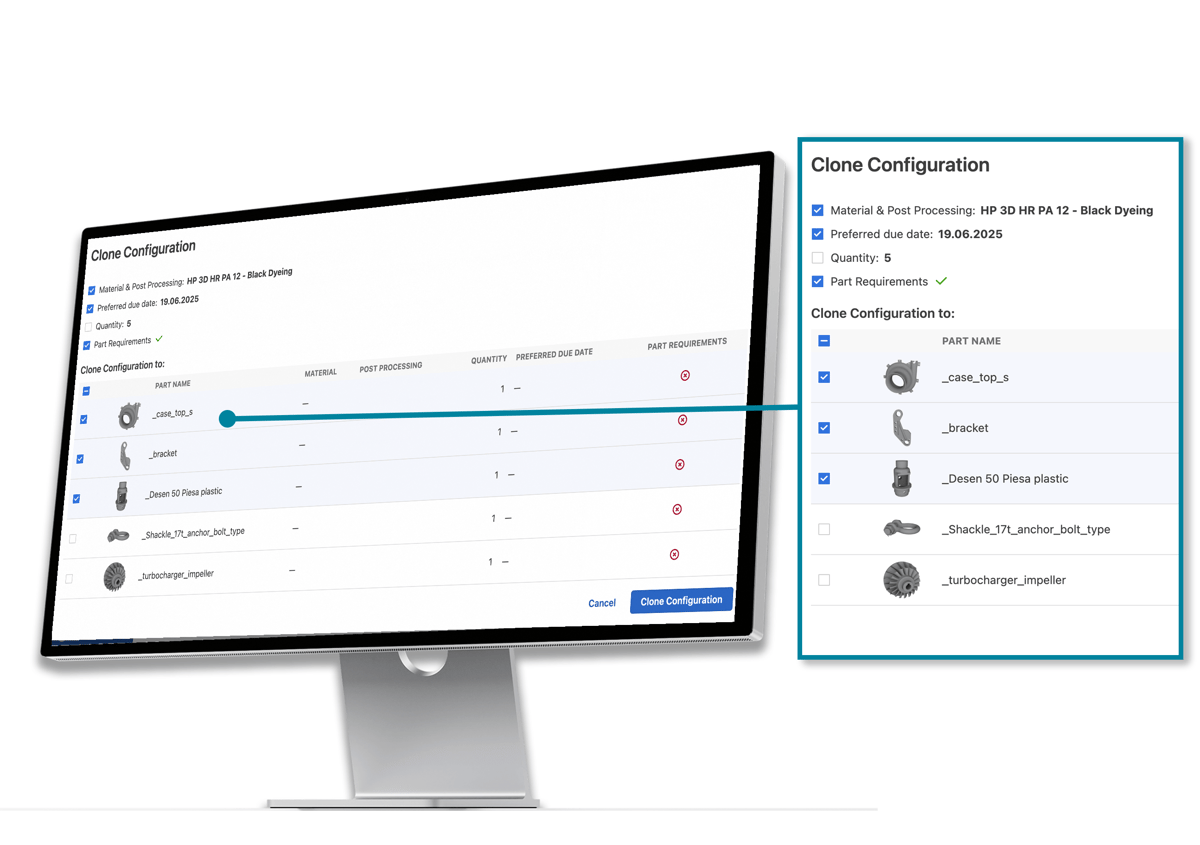
In 25.6, we introduced clone configuration, enabling users to configure large quotes or orders without repetitive manual entry.
Key improvements include:
- More granular and safer clone configuration for quotes and orders
- Auto-save in the basket to remove unnecessary steps
- Inserts configuration and pricing with full visibility across quotes, orders, PDFs, and production views
- Improved 3D uploads with progress indicators and retry options
- Better batch management for scheduling large orders
We also added support for EU-compliant e-invoicing formats (ZUGFeRD and Factur-X), reducing friction for service bureaus operating in regulated markets.
Better Production Handover and Shopfloor Visibility
Bridging the gap between planning and production was a major theme.
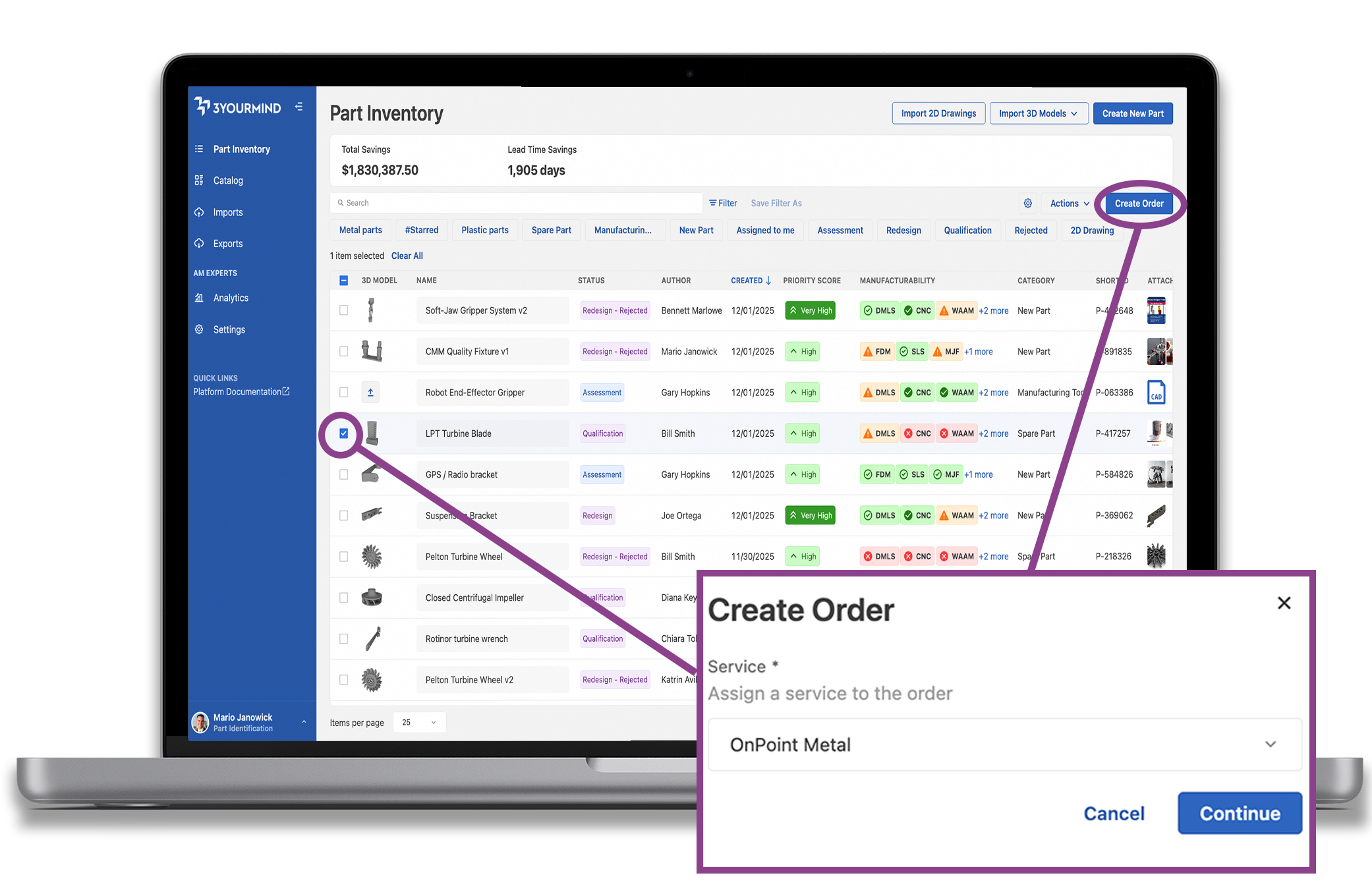
In 25.12, we enabled users to create orders from the Part Inventory, empowering you to do more in fewer clicks.
Teams can now create orders directly from the Part Inventory and distribute parts to connected services in a single flow. Coordinators can assign operators and pass instructions directly on orders, improving accountability and clarity at handover.
The Production Queue was upgraded with bulk actions, clearer primary actions, and one-click access to attachments, cutting clicks and speeding up workflow progression.
Images on production sheets and consistent part-weight visibility across the platform help reduce ambiguity and improve material planning on the shop floor.
Admin, UX, and Platform Polish
Admins gained stronger controls and better ergonomics, including:
- Enhanced user blocking
- Clone material actions
- Configurable overproduction settings
- Customizable navigation in the Service Workspace
We also improved SEO metadata and page titles, refreshed default analytics dashboards to surface more relevant metrics, and expanded language support.
The Big Picture
Across seven releases, 2025 delivered meaningful progress in three directions:
- Stronger decision support with richer manufacturability checks and clearer cost transparency
- Less manual work through automation of materials, assemblies, metadata extraction, and configuration
- Faster end-to-end flow with performance gains and smoother handover from inventory to production
The result: teams can screen parts faster, trust their data more, and move from idea to production with fewer clicks and fewer surprises.
Want to deep dive into 3YOURMIND's 2025 product highlights? Check out our release notes.